What is tracing for?
Traditional software is largely deterministic. Given the same input, you get the same output, and when something breaks, a stack trace or a log line points you to the problem. But for LLM applications that's not the case. You need something else to follow your agent's behavior: traces.
A trace captures the full journey of a single request through your application. Each step is a distinct operation, parent-child relationships between steps are preserved, and the relevant data (inputs, outputs, token counts, etc.) is attached to each one.
With tracing, you can see:
- Which documents were retrieved for a given query, and whether they were relevant
- What prompt was sent to the model, after all template variables were filled in
- Why the agent chose that tool, based on what was in the model's context at the time
- Where the time and money is going: which steps consume the most tokens or take the longest, and why
The anatomy of a trace
A trace can be as complex or as simple as your application requires, but all traces share the same basic structure.
Hierarchy
A trace is a tree. At the top is the trace itself, representing the entire operation. Nested inside it are spans, each representing a single step in the process. Spans can contain other spans, forming a parent-child structure that mirrors the actual execution of your code.
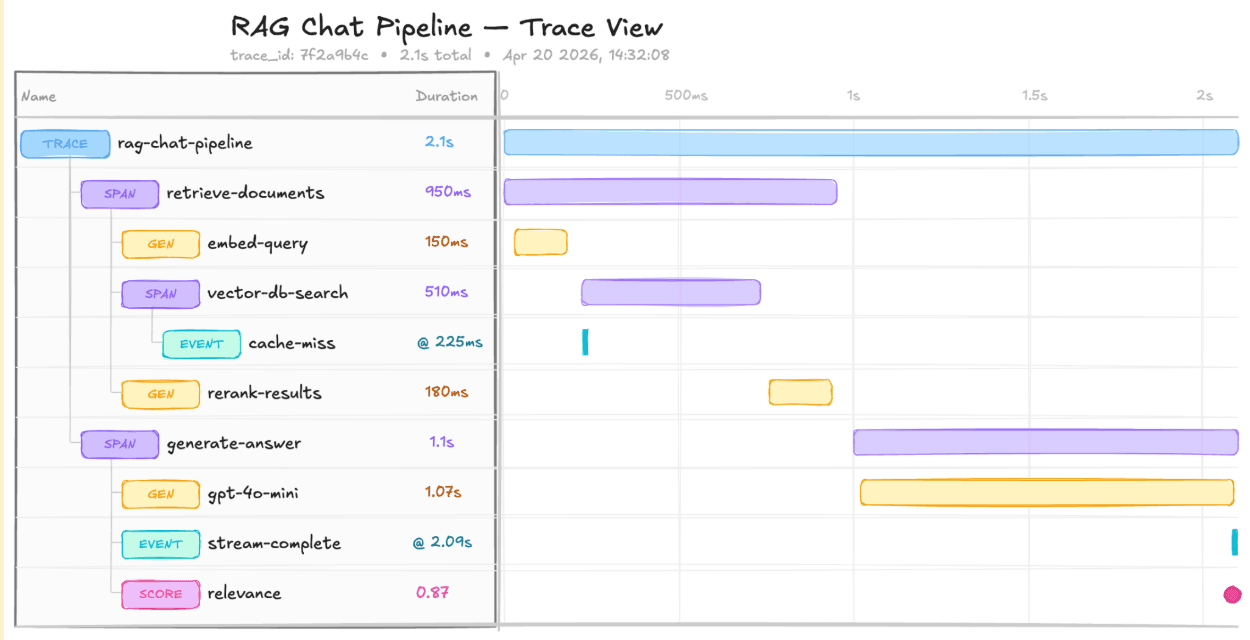
You can see what happened in what order, and which steps were part of which larger step.
Input and output
Every span has an input and an output. For an LLM span, the input is the prompt (sometimes the full message history), and the output is the response. For a retrieval span, it can be as simple as a search query and the returned documents.
Span types
In order to make it easy to differentiate between operations, you'll see different types of spans. The most common ones are:
| Span type | Captures | Example |
|---|---|---|
| Generation spans | A call to a language model | Full prompt or message history as input, the completion as output, plus metadata like the model name and token counts |
| Retrieval spans | A step that fetches information from an external source | Query and the returned documents |
| Tool call spans | An invocation of a tool or function by an agent | Which tool was called, the arguments, and the return value |
| General/default spans | General processes | Highly dependent on the use case |
Span types are a convenience, not a rigid schema. They make traces easier to read and filter. In a trace with twenty spans, being able to quickly spot the three LLM calls saves time.
Cost, latency, token usage
The most relevant span type here is the generation span. There are a few LLM-specific attributes you will always want to track:
- Token usage
- Cost of the LLM call
- Latency
These metrics are recorded per span but aggregated at the trace level.
TODO: show examples based on specific use cases with Langfuse screenshots using general terms:
- Flight booking agent
- Customer support chatbot
The scope of a trace
Spans can be grouped into traces, and traces can be grouped into sessions. But where do you draw the line between a trace and a session?
A general rule of thumb is: one trace corresponds to one unit of work from the user's perspective. In most applications, that means one trace per request-response cycle.
TODO: show examples based on specific use cases, describing the scope of a trace vs session:
- Chatbot
- Ideally 1-2 sufficiently different use cases
Where to start
TODO:
- Refer to how-to guide of setting up traces, make sure your traces adhere to the quality descriptions above
- If they want to, they can go deeper into the topic (linking to sub-pages)
- If they are happy, next loop step
- Idea: add a small exercise showing incomplete traces, asking "what would you improve about this trace?" with expandable answers (missing cost, missing input/output, etc.)